
Understanding Sensitivity Labels
To further align our organization with best practices regarding data governance, we have recently begun onboarding Microsoft Purview, which enables data classification and the application of data sensitivity labels. To help clarify how the sensitivity labels are applied to the three data classifications we use, please review this diagram.
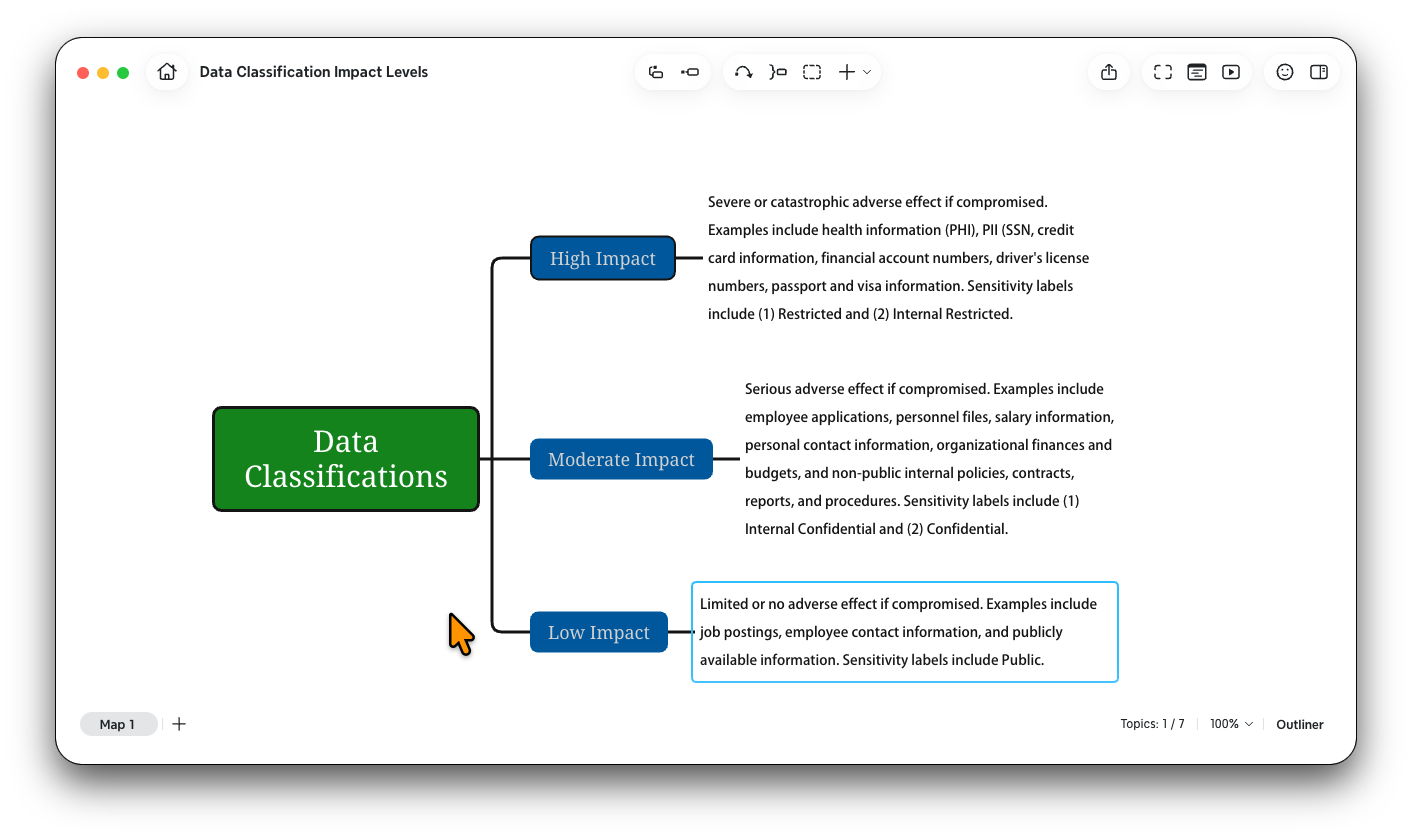
It is very important to use the available sensitivity labels to classify and protect the data and information resources you use.
What purpose do sensitivity labels serve?
Sensitivity labels help classify and protect emails, documents, SharePoint sites, and Teams sites that may contain sensitive information. These help to protect against accidental oversharing or providing information to parties where it is not required.
What sensitivity labels are available?
Currently, we have six label types that can be applied to many of the resources we use, including email, SharePoint, Teams, and meetings (see the sensitivity labels diagram).
(6) Restricted Internal
(5) Restricted External
(4) Confidential Internal
(3) Confidential External
(2) Internal
(1) Public
What are the differences among the available sensitivity labels?
(6) Restricted Internal - This label should only be used by New River employees for internal resources and communications that contain confidential information AND/OR PII. Provides encryption and won't allow forwarding when used with email. Files can be downloaded by the recipient, and any information they contain can't be copied or captured in a screenshot. Attempts to forward the information directly will fail, and if the file is sent in a separate email to another person, they won't be able to open the document. Once opened in a program, a banner will appear stating that the content is restricted. Won't allow external sharing with anyone who is not a New River employee.
(5) Restricted External - This label should be used for both internal and external resources and communications that contain confidential information AND/OR PII. Provides encryption and won't allow forwarding when used with email. Files can be downloaded by the recipient, and any information they contain can't be copied or captured in a screenshot. Attempts to forward the information directly will fail, and if the file is sent in a separate email to another person, they won't be able to open the document. Once opened in a program, a banner will appear stating that the content is restricted.
(4) Confidential Internal - This label should only be used for internal resources and communications that contain confidential information with NO PII. Provides encryption with no forwarding restrictions when used with email. Files can be downloaded by the recipient, and any information can be copied, captured in a screenshot, or otherwise sent to others. Once opened in a program, a banner will appear stating that the content is restricted to New River employees. Won't allow external sharing with anyone who is not an NRCTC employee.
(3) Confidential External - This label should be used for both internal and external resources and communications that contain confidential information with NO PII. Provides encryption with no forwarding restrictions when used with email. Files can be downloaded by the recipient, and any information can be copied, captured in a screenshot, or otherwise sent to others. Once opened in a program, a banner will appear stating that the content is restricted.
(2) Internal - This label should be used only for internal resources and communications among New River employees. It won't allow external sharing to anyone who is not a New River employee.
(1) Public - This label should be used for both internal and external resources and communications that do NOT contain any confidential organizational information, PII, or other sensitive information. Data with this label may be publicly shared.
Current impacts of labels on other resources
Labels applied to meetings, SharePoint sites, and Teams sites can also impose other restrictions, such as limiting guest invitations and external sharing with people outside our organization. While most labels don't restrict guest invitations or external information sharing, the internal label will not allow external sharing or adding people who are not New River employees.
DocuSign currently only accepts the PUBLIC sensitivity label, although support for additional labels is expected in the future.